Polka Dots: A Playful Font for Modern Design
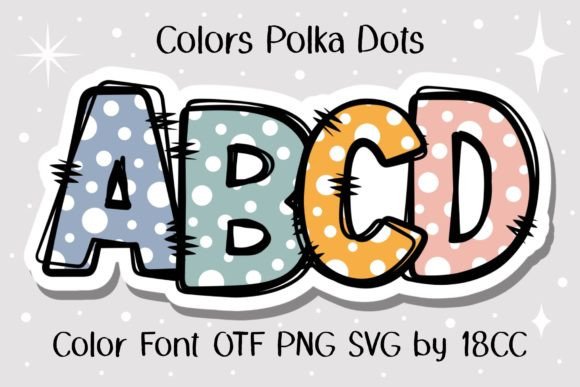
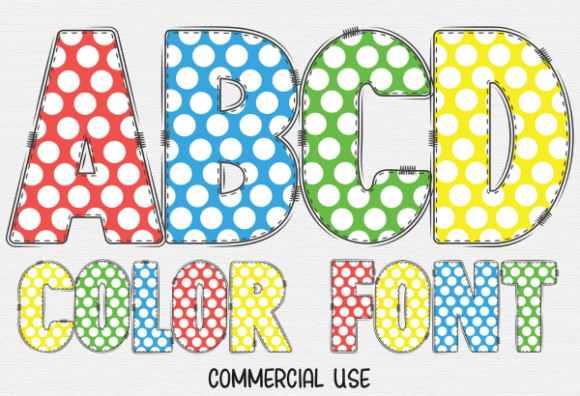
Injecting personality and whimsy into a design project often hinges on a single, well-chosen element. The Polka Dots color font is precisely that kind of element—a typographic asset that transforms standard text into a vibrant, textured focal point. This font isn't just a collection of letters; it's a patterned design tool that brings a delightful, tactile quality to any creative work, making it an invaluable resource for designers seeking to break away from the ordinary.
In the landscape of modern graphic design, where visual distinctiveness is paramount, Polka Dots offers a unique solution. It moves beyond simple color or style, embedding a playful pattern directly into the typography. This approach is incredibly effective for creating immediate visual interest and establishing a strong, memorable brand identity. For projects that demand a friendly, approachable, or retro-modern aesthetic, this font delivers impact with remarkable ease.
Practical Applications Across Design Disciplines
The versatility of the Polka Dots font allows it to enhance a wide array of creative projects. Its inherent charm can elevate materials from mundane to eye-catching, supporting both digital and print-focused workflows.
- Branding and Logo Design: Use it for a brand name or tagline to instantly communicate a fun, youthful, or creative personality. It’s perfect for boutique shops, children's brands, event planning services, or any business aiming for a lighthearted market position.
- Marketing and Social Media Graphics: Create scroll-stopping headlines for Instagram posts, Facebook ads, or promotional flyers. The textured look adds depth and a handcrafted feel that stands out in crowded digital feeds.
- Editorial and Web Design: Apply it to pull quotes, section headers, or feature titles in magazines, blogs, or website hero sections. It adds a decorative touch without overwhelming the overall layout, contributing to a dynamic visual hierarchy.
- Packaging and Merchandise: Design product labels, tote bags, or apparel graphics that require a nostalgic or playful vibe. The patterned text can become a signature element of product presentation.
- Digital Products and Presentations: Enhance e-book covers, worksheet titles, or slide deck headers to make content more engaging and visually cohesive.
Integrating Polka Dots into Your Design Workflow
To maximize the effectiveness of a specialized font like Polka Dots, thoughtful integration into your design system is key. Always consider the context of your project and your audience's expectations.
First, ensure compatibility. The black version works seamlessly with Cricut Design Space and other cutting machines, making it ideal for DIY crafts and physical product creation. However, the full-color version requires design software like Adobe Photoshop, Illustrator, or Silhouette Studio. This distinction is crucial for planning your production workflow, especially for print design or merchandise.
Next, balance its playfulness with readability. Use Polka Dots for headlines, logos, or short bursts of text where its detailed pattern can be appreciated. For body copy, pair it with a clean, simple sans-serif or serif font to maintain legibility and create a clear visual hierarchy. Consider the color palette; the font's impact can be adjusted by changing its fill color to match your brand's scheme, ensuring it complements rather than clashes with your overall composition.
Finally, view it as part of your broader creative assets toolkit. A font like Polka Dots is not a universal solution, but a strategic one. It shines when used to inject energy and specificity into a design. By evaluating factors like scalability, consistency with your brand's voice, and the specific goals of your communication, you can harness its potential to create professional, polished, and highly engaging visual content that resonates with your audience.